

It is important to protect yourself against cyberattacks during business travel because this can be a moment when you are particularly vulnerable. When traveling, you are often connected to public Wi-Fi networks, which can give cybercriminals an easy way to monitor your online activity and steal your sensitive data. You can also be targeted by phishing or ransomware attacks while traveling, especially if you use unsecured devices or click on suspicious links.
It is therefore important to take security measures to protect yourself against cyberattacks during business travel. Here are a few tips to help you stay protected:
Use a VPN whenever you connect to a public Wi-Fi network to encrypt your traffic and protect your data.
Do not open suspicious links or attachments, and do not respond to requests for personal or financial information by email or text.
Install security software on your computer and keep it updated regularly.
Use unique, strong passwords for all your online accounts.
Do not leave your computer or mobile device unattended while traveling.
By following these tips, you will be able to effectively protect your business against cyberattacks during business travel.
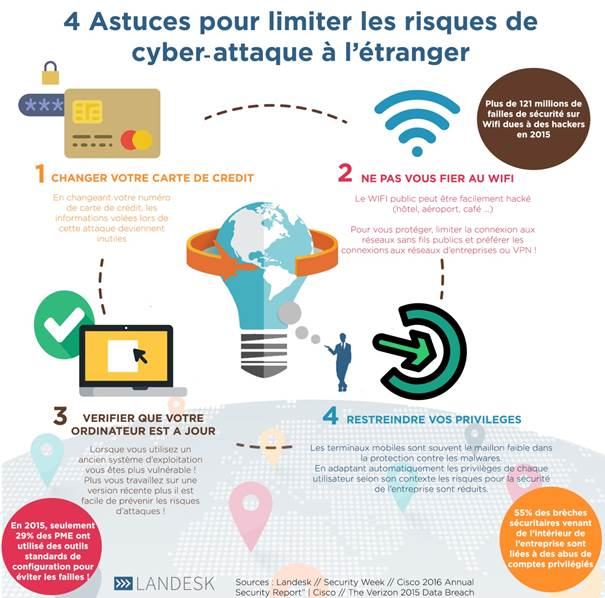
Example with the IT risks of public Wi-Fi networks in hotels:
Hotel Wi-Fi networks can pose security risks to users. Here are some examples of potential risks:
Traffic monitoring: it is possible that hotel staff or third parties may be able to monitor your traffic on the hotel's Wi-Fi network and access your sensitive data.
Hacker attacks: hotel Wi-Fi networks can be targeted by hackers seeking to access your sensitive data or infect your device with malware.
Phishing and ransomware: you can be targeted by phishing or ransomware attacks while connected to a hotel's Wi-Fi network. These types of attacks aim to steal your personal data or demand a ransom for access to your data.
To protect your business against these risks, it is recommended to use a VPN (Virtual Private Network) when connecting to public Wi-Fi networks such as those in hotels. A VPN encrypts your traffic and lets you browse the internet anonymously, making it harder for third parties to monitor your online activity or access your sensitive data. It is also important to follow security best practices, such as using unique, strong passwords, installing security software on your computer, and updating it regularly.